
If a printed QR destination changes, do you need a reprint?
A manufacturer prints a QR link to an installation guide on a product box. Six months later, the guide moves while older boxes remain in stock. In this illustrative example, the key decision belongs before printing: should the code contain the document URL or a stable entry address the business can manage? The printed pattern cannot update itself. Keeping it useful depends on retaining control of the address encoded in it.
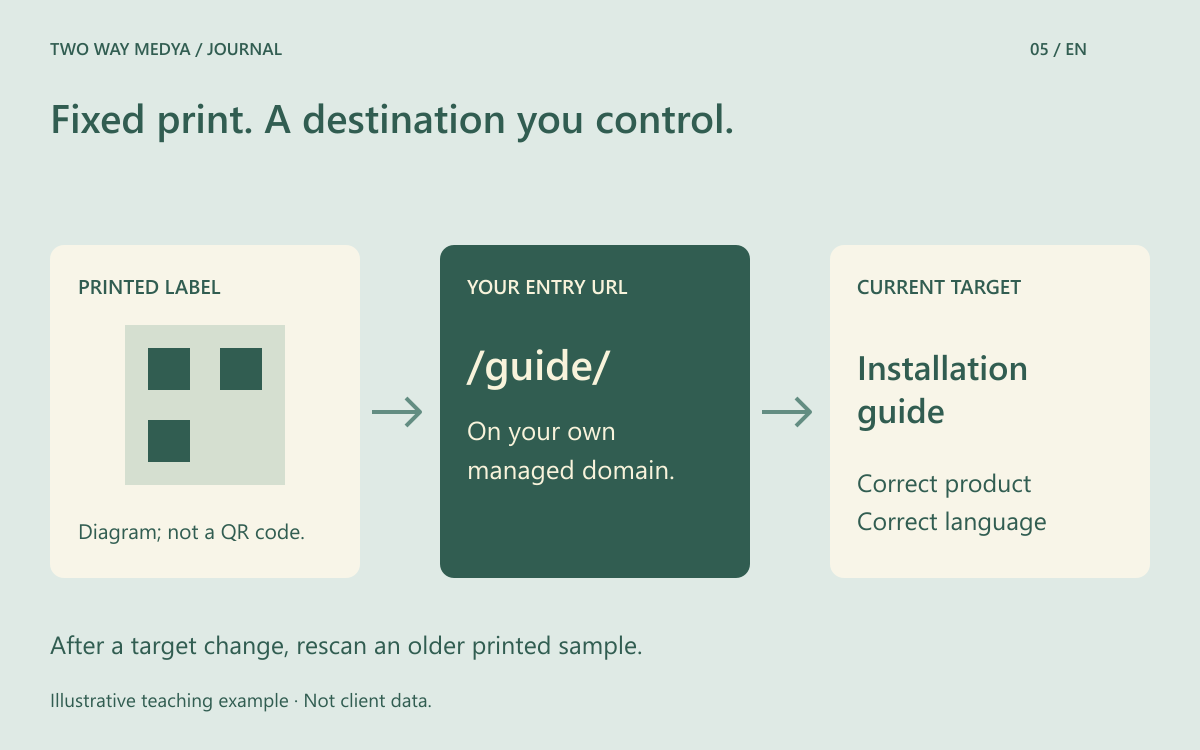
Separate the printed pattern from the destination
Editing a destination in a QR service does not change the ink. Typically, the printed code opens a stable intermediate address whose behaviour can be changed. If it contains an old PDF URL that you no longer control, changing an unrelated dashboard will not repair it. Before printing, scan the code and record both the first domain and the final destination. Establish who controls each address and who maintains it.
Choose a route that fits the material’s lifespan
A direct destination may be enough for a short-lived, one-off announcement. Long-lived packaging can benefit from a short entry path on the business’s own domain. If a third-party redirect service is involved, consider account ownership, access and what happens when the service ends. This does not require every business to buy another product. A maintained page on the existing website can also meet the need.
Define how a changing destination should behave
MDN’s redirection guide distinguishes permanent and temporary HTTP redirects. Ask the developer to explain suitable redirect and caching behaviour for a frequently changing campaign destination, rather than treating it as a permanent move by default. There is no single status-code prescription for every QR journey. Decide how long older links must work, how many transitions are involved and how the result will be checked.
Keep the promise made by the old package
A box promising an installation guide should not lead to an unrelated homepage when a new campaign begins. Match the guide’s language, product model and required edition to the item in the visitor’s hands. When a product is discontinued, its support information can remain available with a separate explanation of availability. An ended campaign also needs an appropriate closing destination. A working link and a useful destination are separate acceptance conditions.
Test the actual printed material
DENSO WAVE describes a four-module quiet zone around a QR code; its reading-problems guidance discusses distortion and obstruction. Do not casually place a logo over the pattern. A successful scan from a screen does not validate glossy or curved packaging. Test a full-size printed sample with different phones, on the intended surface and in expected lighting. Avoid promising one physical size for every setting. Include a readable short address beside the code.
Assign maintenance after handover
Name an owner for domain renewal, destination edits and periodic checks. After an update, scan an older physical sample rather than only opening the new URL. Confirm that the correct language and content appear. Maintain a small register of printed materials, entry URLs, destinations and check dates. Adding this routine to the website design scope makes responsibility between the print and web teams explicit.
Frequently asked questions
If a code scans but opens the wrong page, is the printing faulty?
Not necessarily. The pattern may be readable while its intermediate address or redirect target is wrong. Verify the encoded address and its destination separately.